> ## Documentation Index
> Fetch the complete documentation index at: https://docs.dataspike.io/llms.txt
> Use this file to discover all available pages before exploring further.
# Search
> Search and monitor individuals or organizations for AML compliance using the Dataspike dashboard and API.
The **Dataspike AML Search API** and dashboard empower compliance teams to identify individuals and organizations across **global and domestic watchlists**, **sanction databases**, and **politically exposed persons (PEP)** registries with precision and speed.
Our system aggregates intelligence from:
* **All major international sanctions lists** (UN, EU, OFAC, HMT, etc.)
* **Hundreds of domestic enforcement and regulatory lists**
* **High-risk entity databases and industry blacklists**
* **Thousands of global media sources** continuously scanned for adverse news and reputational risk
With advanced filtering options — including name, country, date of birth, and category — Dataspike enables **comprehensive AML compliance coverage** across jurisdictions and industries.
> 🔍 Use the **Dashboard** for quick manual investigations, or the **API** for automated, large-scale screening and continuous monitoring.
***
## Search using Dashboard
Performing a search via the **Dataspike Dashboard** is fast and intuitive. Follow these steps to run your first AML check.
### 1. Navigate to the Reports tab
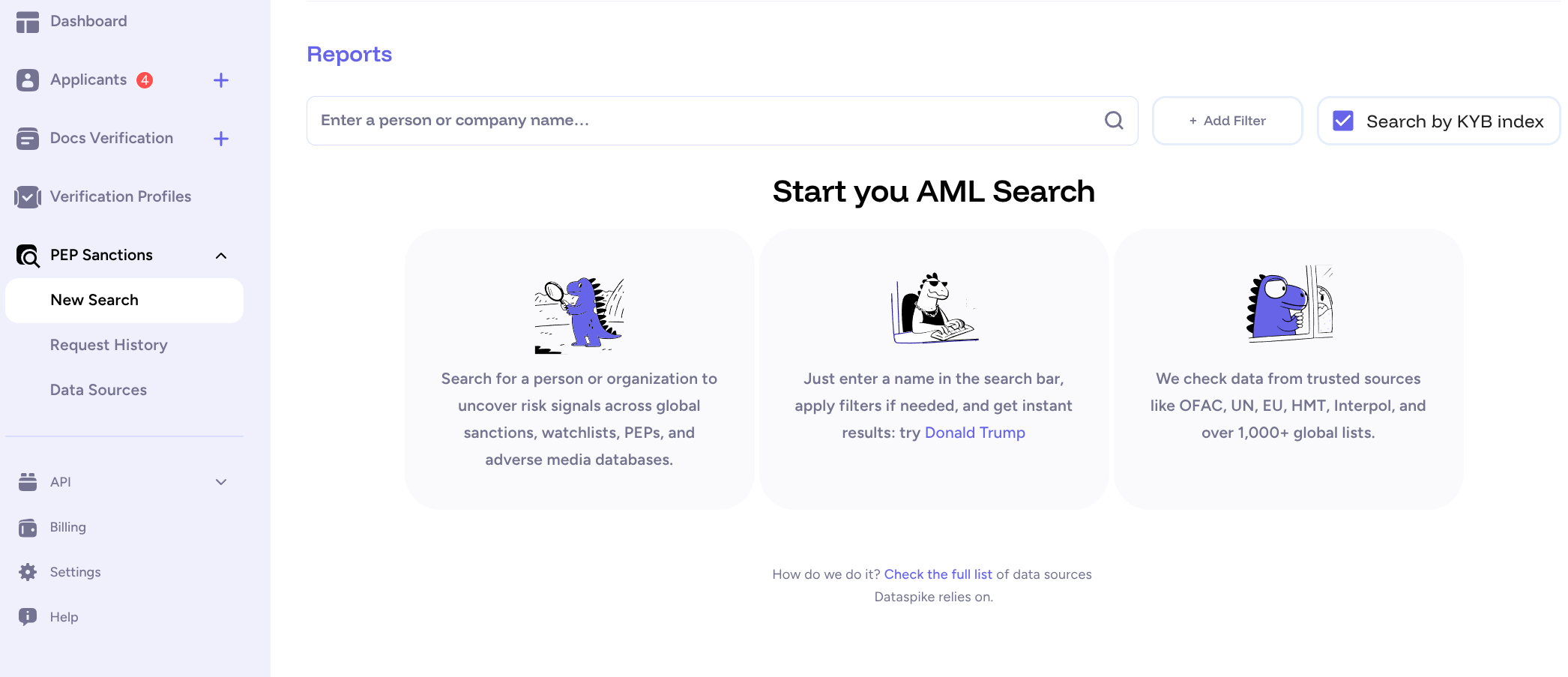
Go to **PEP & Sanctions → New Search** from the left sidebar in your Dataspike dashboard.\
This section allows you to search, review, and monitor AML data in real time.
 ***
### 2. Enter Search Parameters
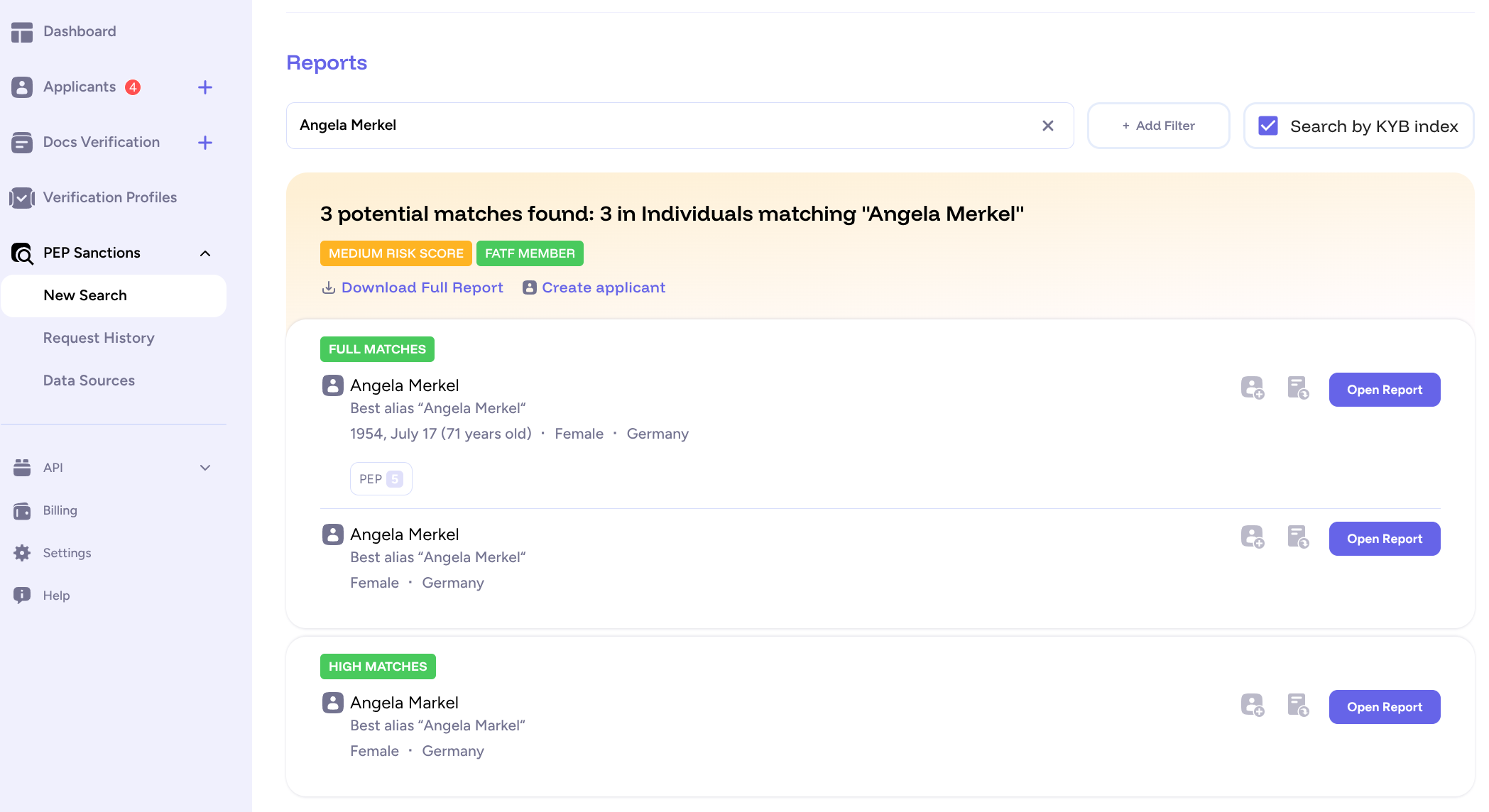
In the **Reports** interface, enter the name of a person or organization you want to search for.\
You can refine your results by adding more details — such as **country** or **date of birth**.
***
### 2. Enter Search Parameters
In the **Reports** interface, enter the name of a person or organization you want to search for.\
You can refine your results by adding more details — such as **country** or **date of birth**.
 ***
### 3. Apply Filters (Optional)
Additional filters allow for deeper targeting. Depending on your setup, you may narrow results by:
* Country or region
* Date of birth
* Category (PEP, sanction, enforcement list)
* Data source or registry
***
### 4. Create an Applicant (Optional)
For ongoing monitoring, you can create a new **Applicant** directly from a search result.\
Enable **Daily Monitoring** to automatically recheck the applicant’s data every 24 hours.\
You’ll receive webhook notifications if new relevant information appears in global AML databases.
> 🕒 Continuous monitoring helps maintain compliance without needing to manually re-run searches.
***
### 5. Export PDF Report (Optional)
You can export a detailed PDF report of any search result.\
The time to generate depends on the number of matches and data complexity.
When the report is ready, you’ll be prompted to **save or download** it to your local device.\
This PDF includes all search details, match summaries, and verification timestamps — ideal for audits or recordkeeping.
***
## Search using Dataspike API
Searching via the **[API](https://docs.dataspike.io/api)** is a more advanced approach that allows you to:
This approach is ideal for backend integrations or batch screening processes.
**Example: basic search using cURL**
```bash theme={null}
curl -X POST "https://api.dataspike.io/api/v3/aml/search" -H "ds-api-token: $API_KEY" -H "Content-Type: application/json" --data '{
"full_name": "John Doe",
"countries": ["GB"],
"date_of_birth": {
"gte": "1987-12-24",
"lte": "1987-12-24"
}
}'
```
**Example response:**
```json theme={null}
{
"requested_name": "John Doe",
"search_uuid": "01234-...-123",
"max_risk_score": "Low",
"data": [
{
"uuid": "a123-...-123",
"type": "Person",
"annotation": "Politically exposed person – former government official.",
"tags": ["PEP", "Finance"],
"risk_score": "Low",
"fields": {
"names": [
{ "full_name": "John Doe", "lang": "en" }
],
"dates_of_birth": ["1987-12-24"],
"citizenships": ["GB"],
"addresses": [
{ "country": "United Kingdom" }
],
"sources": [
{ "name": "UK Sanctions List", "last_updated": "2025-10-01" }
]
},
"updated_at": "2025-10-20T15:45:00Z",
"importance_score": 87
}
]
}
```
Refer to the [**API Reference**](/api#tag/AML-Screening) for complete endpoint documentation, query parameters, and result schemas.
***
## Best Practices
* Always start with **Sandbox** to validate integration before switching to production.
* Use **applicants with daily monitoring** for continuous compliance checks.
* Store only essential AML data to meet privacy and retention requirements.
* Configure **webhooks** to be alerted automatically when new matches appear.
***
## Next steps
* [**Create an Applicant**](/document-verification/first-verification) — link your AML checks to verified identities.
* [**Webhook Configuration**](/webhooks) — set up automated notifications for AML hits.
* [**API Reference**](/api) — view all parameters and response formats.
***
### 3. Apply Filters (Optional)
Additional filters allow for deeper targeting. Depending on your setup, you may narrow results by:
* Country or region
* Date of birth
* Category (PEP, sanction, enforcement list)
* Data source or registry
***
### 4. Create an Applicant (Optional)
For ongoing monitoring, you can create a new **Applicant** directly from a search result.\
Enable **Daily Monitoring** to automatically recheck the applicant’s data every 24 hours.\
You’ll receive webhook notifications if new relevant information appears in global AML databases.
> 🕒 Continuous monitoring helps maintain compliance without needing to manually re-run searches.
***
### 5. Export PDF Report (Optional)
You can export a detailed PDF report of any search result.\
The time to generate depends on the number of matches and data complexity.
When the report is ready, you’ll be prompted to **save or download** it to your local device.\
This PDF includes all search details, match summaries, and verification timestamps — ideal for audits or recordkeeping.
***
## Search using Dataspike API
Searching via the **[API](https://docs.dataspike.io/api)** is a more advanced approach that allows you to:
This approach is ideal for backend integrations or batch screening processes.
**Example: basic search using cURL**
```bash theme={null}
curl -X POST "https://api.dataspike.io/api/v3/aml/search" -H "ds-api-token: $API_KEY" -H "Content-Type: application/json" --data '{
"full_name": "John Doe",
"countries": ["GB"],
"date_of_birth": {
"gte": "1987-12-24",
"lte": "1987-12-24"
}
}'
```
**Example response:**
```json theme={null}
{
"requested_name": "John Doe",
"search_uuid": "01234-...-123",
"max_risk_score": "Low",
"data": [
{
"uuid": "a123-...-123",
"type": "Person",
"annotation": "Politically exposed person – former government official.",
"tags": ["PEP", "Finance"],
"risk_score": "Low",
"fields": {
"names": [
{ "full_name": "John Doe", "lang": "en" }
],
"dates_of_birth": ["1987-12-24"],
"citizenships": ["GB"],
"addresses": [
{ "country": "United Kingdom" }
],
"sources": [
{ "name": "UK Sanctions List", "last_updated": "2025-10-01" }
]
},
"updated_at": "2025-10-20T15:45:00Z",
"importance_score": 87
}
]
}
```
Refer to the [**API Reference**](/api#tag/AML-Screening) for complete endpoint documentation, query parameters, and result schemas.
***
## Best Practices
* Always start with **Sandbox** to validate integration before switching to production.
* Use **applicants with daily monitoring** for continuous compliance checks.
* Store only essential AML data to meet privacy and retention requirements.
* Configure **webhooks** to be alerted automatically when new matches appear.
***
## Next steps
* [**Create an Applicant**](/document-verification/first-verification) — link your AML checks to verified identities.
* [**Webhook Configuration**](/webhooks) — set up automated notifications for AML hits.
* [**API Reference**](/api) — view all parameters and response formats.